Best Hunting Times
K SolutionWeather
2.470.00 Reviews
- Version
- 3.6
- Installs
- 10.00K
- Age Rating
- Everyone
Screenshots
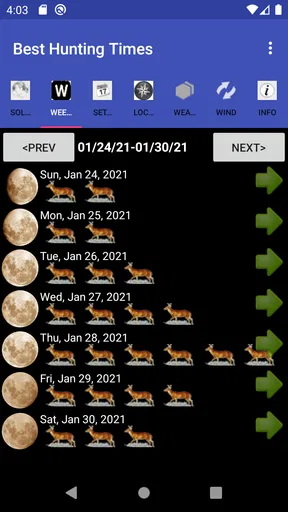
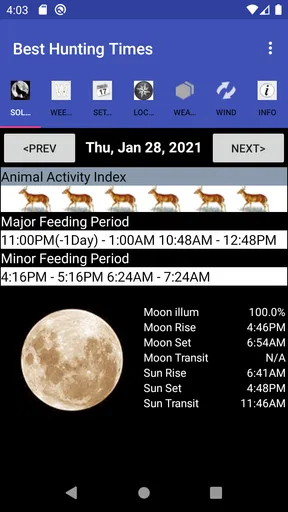
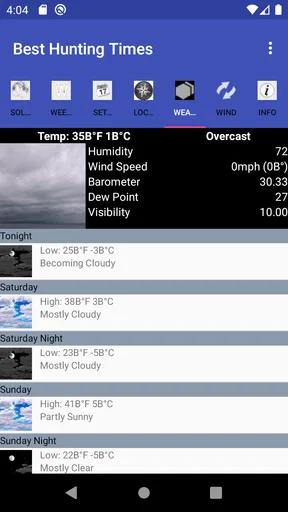
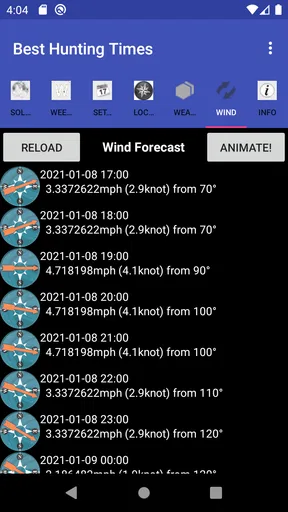
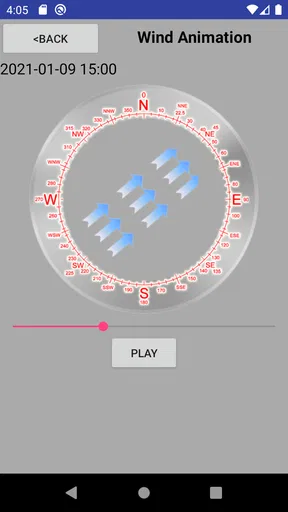
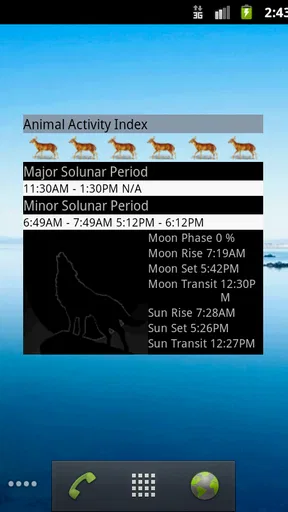
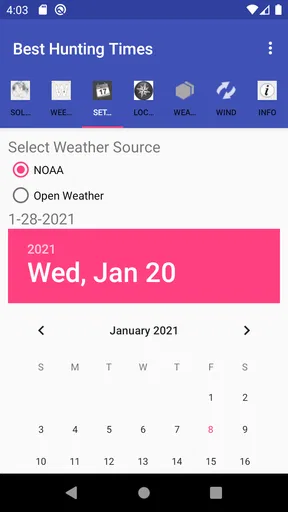
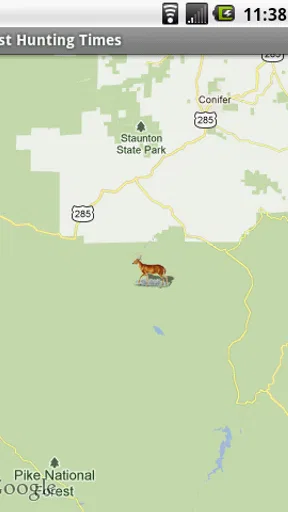
Our Review of Best Hunting Times
 Analysis by Appyee
Best Hunting Times is a paid weather app from K Solution that takes a narrower approach than the usual forecast service. Instead of trying to replace a full weather dashboard, it focuses on helping me decide when a hunting outing may be most worthwhile for a chosen date and location. That sounds simple, but it changes how I use it: I open it while planning, not every few hours to watch rain clouds move across a map.
After spending time with it, I see the appeal for hunters who prefer a direct planning tool rather than a crowded forecast screen. I also see why it will not suit everyone. Its value depends on whether you want a hunting-time calculation specifically, and whether you are comfortable working with a more focused interface than the polished, highly visual apps that dominate general weather services.
How the app presents hunting information
The first thing I noticed is that the app’s purpose is easy to understand. K Solution has built it around a single question: when are the better hunting periods for a particular day and place? That narrow focus is useful for people who already know the area they plan to visit and do not want to sort through radar layers, hourly temperature cards, severe-weather banners, and unrelated forecasts before reaching the information they need.
The app is listed in the Weather category, but I would describe it more precisely as a planning calculator for hunting conditions. It is not the kind of tool I would choose as my only source for deciding whether travel is safe. I would still check a conventional forecast for wind, precipitation, temperature, visibility, and warnings. Best Hunting Times serves a different role: it helps organize the timing of an outing around the app’s hunting-focused results.
That distinction matters because the store’s short description, “Best Hunting Times,” is accurate but very brief. The useful experience comes from applying the result to a real plan. For example, I might use it the evening before a weekend trip, select the intended date and location, note the suggested periods, and then compare those periods with the broader forecast. If the timing looks promising but strong wind or dangerous weather is expected, the general forecast should win the argument.
Readability is strongest when I treat the screen as a quick reference rather than a complete weather report. A focused result can be easier to interpret than a page full of symbols and changing hourly cards. Someone who finds dense forecast apps tiring may appreciate having fewer competing elements. On the other hand, users who depend on large visual cues, color-coded maps, or highly polished modern layouts may find this experience less immediately comfortable.
Navigation that favors a deliberate planning routine
The most practical way to use the app is to follow the same sequence each time: choose the location, choose the date, review the hunting periods, and then cross-check the conditions elsewhere. Creating that routine reduces the chance of treating one result as a complete go-or-no-go decision. It also makes the app easier to use when I am preparing several possible outings in advance.
I would not describe it as a replacement for a general forecast app. Those alternatives are better when I need minute-by-minute rain information, storm tracking, broad environmental context, or a quick glance at tomorrow morning’s temperature. Best Hunting Times is more useful when the question is narrower and the date and location are already part of a plan.
One helpful but easy-to-miss habit is to test more than one possible date before committing to travel. The app is designed for any date and any location, so I can compare a weekday morning with a weekend morning instead of automatically choosing the first convenient option. This is especially useful for people who have flexible schedules. The result is not merely a forecast check; it becomes a way to organize time around a specific outdoor activity.
There is also a practical benefit for people who do not enjoy navigating complicated screens. A dedicated hunting tool can reduce the number of decisions made inside the app itself. I am not searching through layers or trying to interpret several unrelated panels. That simplicity can support older users or anyone who prefers a short, repeatable process, although the actual comfort of the interface will still depend on the device and the user’s visual and motor needs.
Readability for different visual preferences
For readability, I would approach Best Hunting Times with realistic expectations. Its focused purpose may make the information easier to concentrate on than a general weather app, but a focused purpose does not automatically mean that every user will find the presentation accessible. People who need strong text enlargement, high contrast, screen-reader-friendly labeling, or adjustable visual density should test the app on their own device before relying on it for regular planning.
I also recommend checking the result in a calm setting before heading outdoors. Bright sunlight, gloves, movement, and a small phone screen can make any compact interface harder to read. If I prepare the date and location at home, I reduce the need to perform careful reading in a vehicle, at a trailhead, or in poor light. That is a simple workflow change, but it makes the app more practical for users with limited vision, attention fatigue, or difficulty handling a phone while moving.
The app’s content rating is Everyone, which makes it broadly suitable from an age-classification perspective. That does not tell me whether every interaction will be comfortable for every ability level, so I would still consider the user’s personal needs. A family member who wants a straightforward planning aid may find it approachable, while someone who needs extensive customization may prefer a more modern weather service with stronger display controls.
Motor and sensory considerations in the field
Outdoor use introduces challenges that do not appear in a store summary. Hunters may be wearing gloves, carrying equipment, standing in cold weather, or trying to avoid unnecessary movement and noise. Under those conditions, an app that requires careful tapping or repeated data entry can become frustrating. My preferred approach is to do the detailed setup before leaving and use the phone only for a quick confirmation later.
This also makes the app a better fit for a stationary planning moment than for constant field interaction. I would not want to depend on it while walking over uneven ground or while handling equipment. A person with limited fine-motor control may find it easier to use at a table with the phone supported, rather than holding it in one hand and entering information outdoors. If a user has tremors or reduced reach, a larger device or a stylus may make the selection process more manageable, but that is a personal workaround rather than a feature I would attribute to the app.
For sensory preferences, the narrow subject can be an advantage. There is less reason to stare at animated radar, flashing warning cards, or a constantly changing visual map. A user who is easily distracted by motion or crowded screens may prefer a single-purpose result. However, anyone who relies on audio prompts, spoken guidance, or rich nonvisual feedback should verify that the app fits their routine before purchasing it. I would not assume that a simple screen automatically provides an alternative way to receive the information.
One of my more useful workflows is to write the selected time down in a separate note before going outside. That sounds old-fashioned, but it helps when the phone is difficult to operate with gloves or when preserving battery matters. It also gives me a backup reference if I do not want to repeatedly unlock the device. The app is therefore most effective as part of a small planning system, not as the only object involved in the outing.
Situational access: when the focused design helps
Best Hunting Times makes the most sense for someone who hunts in different places or plans trips around changing dates. A user can choose a location rather than relying only on a single home area, which is valuable for comparing a nearby public land area with a family property or a planned trip farther away. The important point is to enter the actual destination rather than assuming that a nearby town will produce an equally useful result.
That location habit is one of the app’s biggest practical trade-offs. A result for the wrong place can create false confidence. Terrain, local weather, access conditions, and travel time still matter, so I would use the most relevant location available and then confirm the broader conditions for that exact area. The app can help with timing, but it cannot turn an approximate location into a complete field assessment.
The date selection is similarly useful for advance planning. If I am coordinating with another person, I can examine possible outings before arranging transport or time away from work. This is more convenient than waiting until the night before. It also supports users with energy limitations or fixed schedules because they can search for a date that fits their capacity instead of forcing themselves into the first available opportunity.
For a realistic example, imagine planning a morning outing with a friend who cannot comfortably spend a full day outside. I could use the app to identify the more promising period, compare it with the ordinary forecast, and plan a shorter trip around the overlap. We might choose a later departure, reduce unnecessary waiting, and return before conditions become uncomfortable. That is where the app feels genuinely helpful: not because it guarantees success, but because it gives structure to a limited window of time.
It can also help people who are new to planning hunting trips. A beginner may not know how to turn a date and location into a practical schedule. The app offers a starting point for that conversation. I would still encourage a new hunter to learn local regulations, land-access rules, safety procedures, and weather awareness separately. No timing result should replace responsible preparation.
Where the app still creates friction
The low average rating of 2.4 from roughly one hundred twenty ratings suggests that many users have not found the experience consistently satisfying. I would take that seriously before paying for it. The app has around ten thousand installs, so it is not an unknown experiment, but it also does not have the broad adoption of the major weather platforms. Its relatively small audience makes personal testing especially important.
Price is another part of the decision. Best Hunting Times costs $2.99, so I would not install it casually if I only hunt once or twice or already have a planning method that works. For a regular hunter who repeatedly compares dates and locations, the focused purpose may justify the purchase. For someone seeking a complete weather service, the same money may be better spent elsewhere or kept for a broader tool that combines forecasts, maps, alerts, and outdoor planning.
The app’s current version is 3.6, and it supports devices running Android 5.0 or later. That makes it relevant to users with older compatible hardware, which can be useful if a dedicated outdoor phone is not a recent model. Still, older devices may have smaller screens or slower interactions, so compatibility alone should not be confused with comfort. I would install it on the device I actually take outdoors, not just test it on a newer phone at home.
Another limitation is the risk of overinterpreting the result. The phrase “best hunting times” can sound more certain than any planning calculation deserves. Animal movement is affected by many local and changing factors, and the app’s result should be treated as guidance rather than a promise. My strongest recommendation is to combine it with current weather, daylight awareness, local knowledge, legal requirements, and a realistic assessment of the user’s own safety and stamina.
People who need accessibility features beyond a simple focused interface may also want a trial period or a clear return option before committing. I would especially advise caution for users who depend on large controls, spoken output, strong contrast, or customized text. The app may work well for them, but the available facts about the product do not give me a reason to promise that it will. A general weather app with established accessibility controls could be the better choice if those controls are essential.
Who should choose it, and who should skip it
I would recommend Best Hunting Times to a regular hunter who wants a compact way to compare dates and locations and who is happy to use a separate weather service for safety information. It is also a reasonable fit for someone who dislikes overloaded forecast apps and prefers a repeatable, purpose-built planning step. The ability to examine different dates can be particularly useful for people arranging trips around work, transport, family duties, or limited outdoor energy.
I would skip it if I wanted one app to handle every part of an outdoor decision. It is not the option I would choose for radar, severe-weather monitoring, detailed hourly conditions, or a rich map-based experience. I would also hesitate if I rarely hunt, if the price feels unnecessary for occasional use, or if I need confirmed support for specific accessibility technologies before purchasing.
Compared with the usual weather alternatives, its advantage is focus. A large forecast app gives me more context but also asks me to interpret more information. Best Hunting Times reduces the planning question to a hunting-oriented result, which can save time when I already know the location and date I am considering. The trade-off is that I must supply the judgment that a broader service helps organize: whether travel is safe, whether the conditions are comfortable, and whether the destination is actually accessible.
My inclusive verdict
After using it as a planning companion rather than a complete forecast replacement, I find Best Hunting Times useful in a specific lane. It can make date and location comparisons more manageable, especially for users who benefit from a short routine and less visual clutter. Preparing the result in advance, using the most accurate destination, and recording the selected period separately are three small changes that make it more usable across different abilities and outdoor situations.
At the same time, I would not present it as universally accessible or universally sufficient. Users with motor, visual, sensory, or communication needs should judge the actual interface on their own device, and anyone heading outdoors should pair it with broader weather and safety information. The Everyone rating describes the intended age range, not every person’s interaction experience.
My final view is cautiously positive. The app is most valuable when it answers one planning question clearly, not when it is asked to become an entire outdoor safety system. At $2.99, it is a modest purchase for frequent hunters who will genuinely compare dates and locations, but a questionable one for occasional users or anyone expecting a full-featured weather platform. K Solution’s focused tool earns a place beside a conventional forecast for the right person; it does not replace one.
For me, the deciding test would be simple: if I regularly plan hunting trips and want a dedicated timing reference that I can consult before leaving home, I would consider keeping it. If my priority is accessible, richly detailed, real-time weather information, I would look first at a broader alternative. That balance captures the app’s real strength and its clearest boundary.
Verdict
Strengths of Best Hunting Times
- Simple interface makes hunting time predictions easy to check.
- Useful solunar data can help plan trips around feeding activity.
- Works well for hunters who prefer quick, practical forecasts.
- Location-based information makes predictions more relevant to your area.
- Can support planning without requiring complex hunting knowledge.
Limitations of Best Hunting Times
- Predictions are estimates and cannot guarantee animal activity.
- Some useful features may depend on accurate location permissions.
- Forecast accuracy can vary significantly by region and weather conditions.
- The app may feel limited for users wanting maps or detailed trail tools.
- Frequent notifications could be distracting if alerts are enabled.
Similar Picks in This Category
View All
Weather - By Xiaomi
Xiaomi Inc.4.1

Weather & Radar Forecast
WetterOnline4.8

Weather
OneLouder Apps4.6

AccuWeather: Weather Radar
AccuWeather3.6

The Weather Channel - Radar
The Weather Channel4.6

1Weather Forecasts & Radar
OneLouder Apps4.3
Frequently Asked Questions
What is Best Hunting Times, and how does it work?
Best Hunting Times is a hunting-planning app designed to help users identify potentially productive periods for hunting. It generally uses information such as date, location, sunrise, sunset, moon phase, and other solunar indicators to estimate animal activity. After entering or allowing your location, you can review daily activity periods and plan your outings around the suggested major and minor hunting times.
Does Best Hunting Times require an internet connection or GPS access?
The app may request location access so it can calculate sunrise, sunset, moon position, and hunting predictions for your area. GPS is useful for automatically selecting a location, although some versions may let you enter a place manually. An internet connection can be necessary for maps, updates, or weather-related information, while basic calculated time data may remain available offline depending on the version installed.
Can I rely on Best Hunting Times to guarantee a successful hunt?
No. Best Hunting Times should be treated as a planning aid rather than a guarantee of animal activity or hunting success. Its predictions are based on astronomical and location-related patterns, but wildlife behavior is also affected by weather, food availability, habitat, pressure from other hunters, season regulations, and many unpredictable factors. Always combine the app’s suggestions with local knowledge and responsible field judgment.
What information should I check before using the app for a hunting trip?
Before relying on the displayed recommendations, confirm that your location, time zone, date, and device settings are correct. You should also compare the suggested periods with current weather, legal hunting hours, season dates, licensing requirements, and local wildlife regulations. The app does not replace official guidance, so verify all rules with the appropriate wildlife authority before leaving for the field.
Is Best Hunting Times suitable for beginners as well as experienced hunters?
The app can be useful for both beginners and experienced hunters because its time-based predictions are generally straightforward to understand. Beginners may appreciate having sunrise, sunset, moon information, and activity periods organized in one place, while experienced users can use it as an additional reference when planning trips. However, new hunters still need proper safety training, equipment knowledge, and an understanding of local laws.
